DNS 是计算机网络世界中十分基础的一个概念 / 技术,工作机制很简单,因此在许多计算机网络八股文中常常出现。
然而,我们真的理解 DNS 吗?在终端内输入 ping www.google.com 时,ping 程序的哪个函数负责把域名转变为 IP 地址?如果一个域名有多个 IP 地址,ping 了哪个?nslookup、dig 等工具又是如何实现 DNS 功能的,和 ping 共用了代码吗,还是自己单独实现?
除此之外,在 Nginx 中,我们可以配置一个 upstream,随后在 proxy_pass 中采用 http://<上游名> 的格式来访问上游。可是,上游得转变为 IP 才能访问呀,谁完成了这件事?如果一个上游对应多个 server 呢?
$ dig www.tongji.edu.cn +trace
; <<>> DiG 9.18.39-0ubuntu0.24.04.2-Ubuntu <<>> www.tongji.edu.cn +trace
;; global options: +cmd
.      6707  IN  NS  g.root-servers.net.
.      6707  IN  NS  i.root-servers.net.
.      6707  IN  NS  e.root-servers.net.
.      6707  IN  NS  b.root-servers.net.
.      6707  IN  NS  c.root-servers.net.
.      6707  IN  NS  k.root-servers.net.
.      6707  IN  NS  l.root-servers.net.
.      6707  IN  NS  m.root-servers.net.
.      6707  IN  NS  d.root-servers.net.
.      6707  IN  NS  f.root-servers.net.
.      6707  IN  NS  h.root-servers.net.
.      6707  IN  NS  a.root-servers.net.
.      6707  IN  NS  j.root-servers.net.
;; Received 239 bytes from 127.0.0.53#53(127.0.0.53) in 0 ms

;; UDP setup with 2001:500:2::c#53(2001:500:2::c) for www.tongji.edu.cn failed: network unreachable.
;; no servers could be reached
;; UDP setup with 2001:500:2::c#53(2001:500:2::c) for www.tongji.edu.cn failed: network unreachable.
;; no servers could be reached
;; UDP setup with 2001:500:2::c#53(2001:500:2::c) for www.tongji.edu.cn failed: network unreachable.
;; UDP setup with 2001:503:ba3e::2:30#53(2001:503:ba3e::2:30) for www.tongji.edu.cn failed: network unreachable.
;; UDP setup with 2001:500:2f::f#53(2001:500:2f::f) for www.tongji.edu.cn failed: network unreachable.
cn.      172800  IN  NS  a.dns.cn.
cn.      172800  IN  NS  b.dns.cn.
cn.      172800  IN  NS  c.dns.cn.
cn.      172800  IN  NS  d.dns.cn.
cn.      172800  IN  NS  e.dns.cn.
cn.      172800  IN  NS  ns.cernet.net.
cn.      86400  IN  DS  33094 8 2 CCCF13ED73A83244F7D2936F0B6C3507D85C3EBC5E1BE4FB644064BC 5B5FE3B2
cn.      86400  IN  RRSIG  DS 8 1 86400 20260501050000 20260418040000 54393 . m2WKxn+ABtAN48KRw9LTswYM8CA2N62SXpu1AIQHlEksbj+38SD2IHqy Ko8KN3jy7wIAqjftn5AhNlJDR3Xrse+pE4Y8sULkOpjezaGtbN1einej HKqh5nTrBmMOI37ftMp9RQ9uMIoXx5dm6iqWnAjwzMTlpvg0INqtUZ1Z RIsUxnw3IzomMxx6VR71rdE7SgXNaQFtXb4aXhPBCJIpN4peUWmeDyB3 hBv0t10F20Or9Cn425OXMUnC6VhR1tJEeJHEzV4QQKsdHfin5qvqMREh gU7/3GhSw2Bk1eYysAV2PnX5MGE6GAH1sg7pJQKIVWOj6FOJ3clcvwDX yADhSQ==
;; Received 728 bytes from 198.97.190.53#53(h.root-servers.net) in 153 ms

;; UDP setup with 2001:dd9::44#53(2001:dd9::44) for www.tongji.edu.cn failed: network unreachable.
;; UDP setup with 2001:da8:1:100::44#53(2001:da8:1:100::44) for www.tongji.edu.cn failed: network unreachable.
;; UDP setup with 2001:250:c006::44#53(2001:250:c006::44) for www.tongji.edu.cn failed: network unreachable.
;; UDP setup with 2001:dc7::1#53(2001:dc7::1) for www.tongji.edu.cn failed: network unreachable.
edu.cn.      172800  IN  NS  dns.edu.cn.
edu.cn.      172800  IN  NS  ns2.cernet.net.
edu.cn.      172800  IN  NS  ns4.cernet.net.
edu.cn.      172800  IN  NS  ns5.cernet.net.
edu.cn.      172800  IN  NS  dns2.edu.cn.
edu.cn.      172800  IN  NS  dns3.edu.cn.
edu.cn.      86400  IN  DS  15397 8 2 3A6C89D32B3143D193521CE64389548821DA90F770AB09ECD9C8680B 2F4848B5
edu.cn.      86400  IN  RRSIG  DS 8 2 86400 20260506160830 20260406151642 55980 cn. Hb08oCD/IW5cx6ST9zCi7Uqg+j48ydvwbjxbA+7issg7r2oJ7+WFwmYr 61vktzvItcPf6VuKe28fM//RjblPDp6/TxclguOcBShPtFJW+HberF+5 Wdh514UfEb5wEmniTMULWyTiQre2SomBV41MnWxGGzC97HBAGKawQgCn Zps=
;; Received 546 bytes from 203.119.25.1#53(a.dns.cn) in 104 ms

;; communications error to 101.4.62.35#53: timed out
tongji.edu.cn.    172800  IN  NS  dns2.tongji.edu.cn.
tongji.edu.cn.    172800  IN  NS  dns1.tongji.edu.cn.
tongji.edu.cn.    172800  IN  NS  dns.tongji.edu.cn.
7BIE74R29CSII30PR1H5U8D10IJ93L7D.edu.cn. 21600 IN NSEC3  1 1 0 - 7L95KCFNNQRB0609QQTSVPQV4I0TQ4KI NS SOA RRSIG DNSKEY NSEC3PARAM CDS CDNSKEY
7BIE74R29CSII30PR1H5U8D10IJ93L7D.edu.cn. 21600 IN RRSIG  NSEC3 8 3 21600 20260429024136 20260415035544 44583 edu.cn. VPpl3CMtiXYDVmV1pTu8T/WBX9apoYQ36PFKzYThcVZYP/dgtE6V+VuD VLOLdFtzmd6c7Ft4M2YUhGdFaXfAQ12TvO8o4rqa6DoyGFhNat5c9ZM9 BJ0fkh3cG/O/kdBKU8V7WLpHE8YGtDXfO7Au0EY43mDjqPqYxaXW0QJF HNfyF9/X6SIDDo3FYtclqGkAGpQsvg33U+o/mG+TdZtVPGz8iPWxe7I5 9ljsZQQZqi7JWT7gYJz4QDWBei3vDh/uW8jey3vksbnnGcyhXeO8FxQX gIhkKOOZFCeinhuSpEBwbG0nLkooNryFtPyfjHrDpCMcBgIo5W7r7sQ9 dVOqqw==
TCM6E1O4D70HBNKEKDIPKI94CU4RP1FJ.edu.cn. 21600 IN NSEC3  1 1 0 - TUHB8HAIDQUHFAT0MJSVJV2JESCOGC66 NS DS RRSIG
TCM6E1O4D70HBNKEKDIPKI94CU4RP1FJ.edu.cn. 21600 IN RRSIG  NSEC3 8 3 21600 20260423201119 20260409192012 44583 edu.cn. jrMpLXchohdn0dN4bG4ELPd4Vl8w9EcMCIAuX11GoZpQaqn+RA7aIKvr 9yoHrteGUTqCE0H66PJlV4ZA58of1j59YNde6ON+RxUdPvG8WixwJkrU xY7pAJnucXjCCCCmoncOMk9geceMfCCURhCxcdOv4u1n9gXBcEizCIvX H2ZJt3DytTGtO71KwBd+Mgu/A5/uNmsb9PDrtbZDWlGwRJZZyoNsgufE Bn6vrR+87PoYBFrXlU8elABVQQDhNfQ3yRRBl/p9whXnUk/jRL6QjSXm fNe1lj4gaKbYkLXn4KRyFGUOTO2GsBfcsUQaddpNnQ9n3cr0sYS1j6NH UWLaTw==
;; Received 1016 bytes from 101.4.62.203#53(ns4.cernet.net) in 108 ms

;; UDP setup with 2001:da8:b8:277:202:120:191:30#53(2001:da8:b8:277:202:120:191:30) for www.tongji.edu.cn failed: network unreachable.
;; communications error to 222.66.109.33#53: timed out
;; UDP setup with 2001:da8:b8:277:222:66:109:33#53(2001:da8:b8:277:222:66:109:33) for www.tongji.edu.cn failed: network unreachable.
www.tongji.edu.cn.  3600  IN  A  202.120.189.175
tongji.edu.cn.    3600  IN  NS  dns2.tongji.edu.cn.
tongji.edu.cn.    3600  IN  NS  dns.tongji.edu.cn.
tongji.edu.cn.    3600  IN  NS  dns1.tongji.edu.cn.
;; Received 250 bytes from 202.120.191.30#53(dns.tongji.edu.cn) in 231 ms
上述查询展示了 DNS 迭代解析的完整过程。客户端会先向本地 DNS 服务器(127.0.0.53) 查询根域名服务器地址,这就到了树的根部,一切故事的开始。
随后,从根服务器列表中随机选一个,问,www.tongji.edu.cn 的 IP 是什么呀?某个根服务器说,我不知道,你去问问 .cn 的顶级域名服务器去。客户端从后者再选一个问同样的问题,.cn 的域名服务器踢皮球给 edu.cn,以此类推,直到到达权威服务器,也就是直接管理这条记录的服务器。
xialing@natsu:~$ apt show $(dpkg -S $(which ping) | cut -d: -f1)
Package: iputils-ping
Version: 3:20240117-1ubuntu0.1
Priority: important
Section: net
Source: iputils
Origin: Ubuntu
Maintainer: Ubuntu Developers <ubuntu-devel-discuss@lists.ubuntu.com>
Original-Maintainer: Noah Meyerhans <noahm@debian.org>
Bugs: https://bugs.launchpad.net/ubuntu/+filebug
Installed-Size: 124 kB
Provides: ping
Depends: libcap2-bin, libc6 (>= 2.38), libcap2 (>= 1:2.10), libidn2-0 (>= 0.6)
Homepage: https://github.com/iputils/iputils/
Task: minimal
Download-Size: 44.6 kB
APT-Manual-Installed: no
APT-Sources: http://mirrors.tencentyun.com/ubuntu noble-updates/main amd64 Packages
Description: Tools to test the reachability of network hosts
 The ping command sends ICMP ECHO_REQUEST packets to a host in order to
 test if the host is reachable via the network.
 .
 This package includes a ping6 utility which supports IPv6 network
 connections.
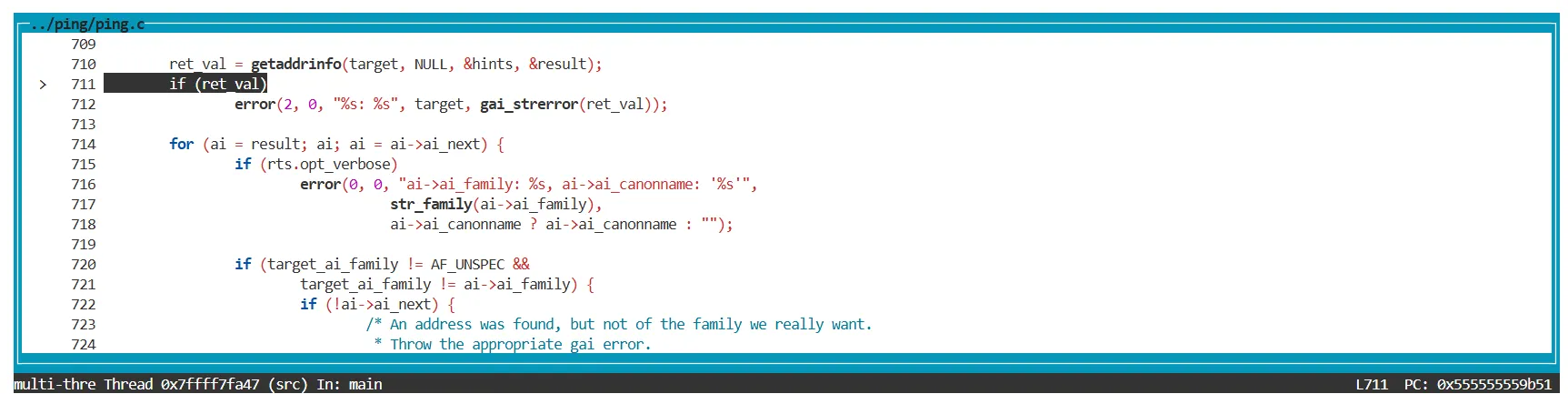
这么看,原来它们都使用了 getaddrinfo 函数,所以我们只需要继续调查这个库函数的描述便 OK 了?
没那么简单。阅读 getaddrinfo 的 man page,我们发现它返回的是主机名的 IP 地址。换句话说,这个函数只能完成 DNS 查询中和 A 记录以及 AAAA 记录的功能。 除此之外,DNS 还能查询各种其他类型的记录,这是 dig 和 nslookup 这种专门处理 DNS 的工具所必备的,然而该库函数无法满足。
在 getaddrinfo 库函数之外
所以进行这样的推理,我们确定 dig 和 nslookup 肯定自行构建了 DNS 报文,而没有通过 getaddrinfo 函数。
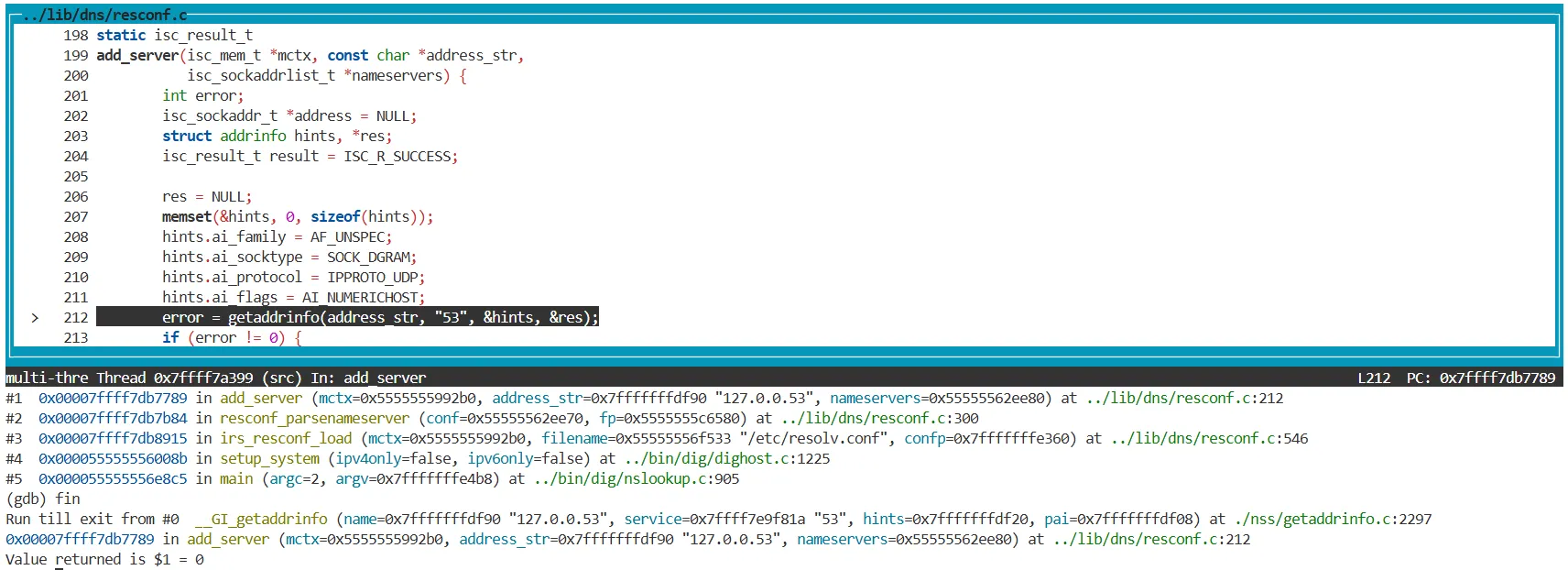
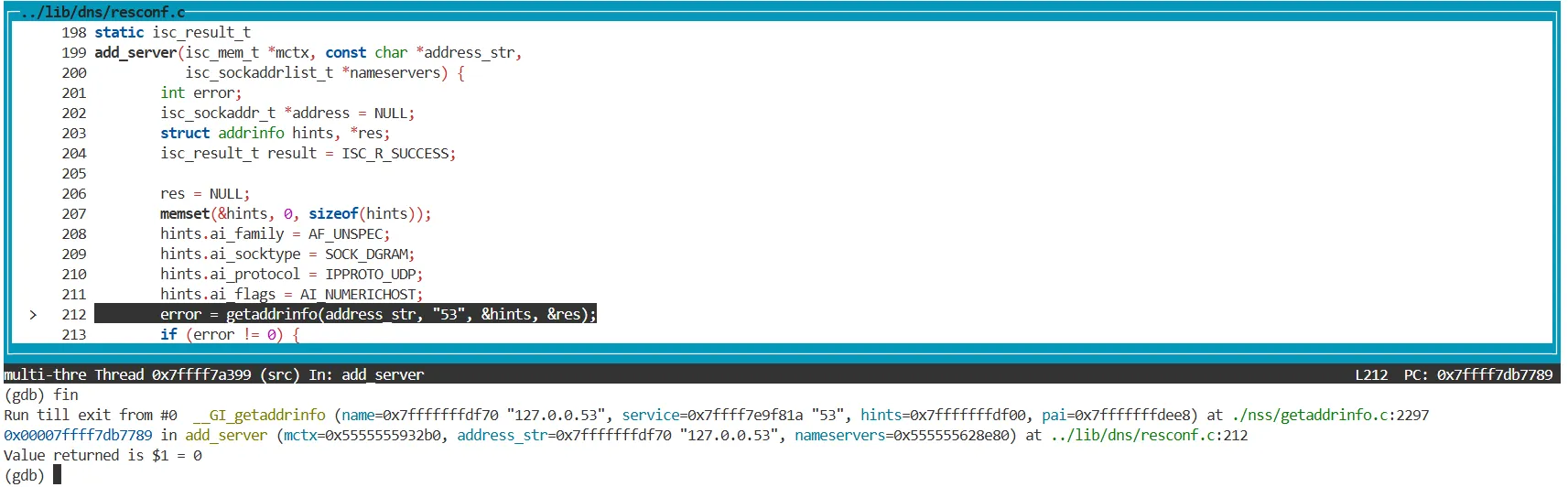
确实是这样的。通过调试这两个程序,发现 dig 和 nslookup 共用了很大一部分代码,这是 AI 给我画出的关系图,我觉得很受用。
# /etc/resolv.conf # This is /run/systemd/resolve/stub-resolv.conf managed by man:systemd-resolved(8). # Do not edit. # # This file might be symlinked as /etc/resolv.conf. If you're looking at # /etc/resolv.conf and seeing this text, you have followed the symlink. # # This is a dynamic resolv.conf file for connecting local clients to the # internal DNS stub resolver of systemd-resolved. This file lists all # configured search domains. # # Run "resolvectl status" to see details about the uplink DNS servers # currently in use. # # Third party programs should typically not access this file directly, but only # through the symlink at /etc/resolv.conf. To manage man:resolv.conf(5) in a # different way, replace this symlink by a static file or a different symlink. # # See man:systemd-resolved.service(8) for details about the supported modes of # operation for /etc/resolv.conf.


](https://static.xialing.icu/img/202604201102404.webp)